

Products · Run the day
Know exactly what's on the shelf, without counting it.
Every retail product, every variant, one live number. Stock moves the moment a sale does — at the front desk, on your online store, or from the backbar.
- Live on-hand counts
- Reorder alerts around the clock
- Retail and backbar kept apart
No booking commissions, no marketplace fees, no client-poaching.
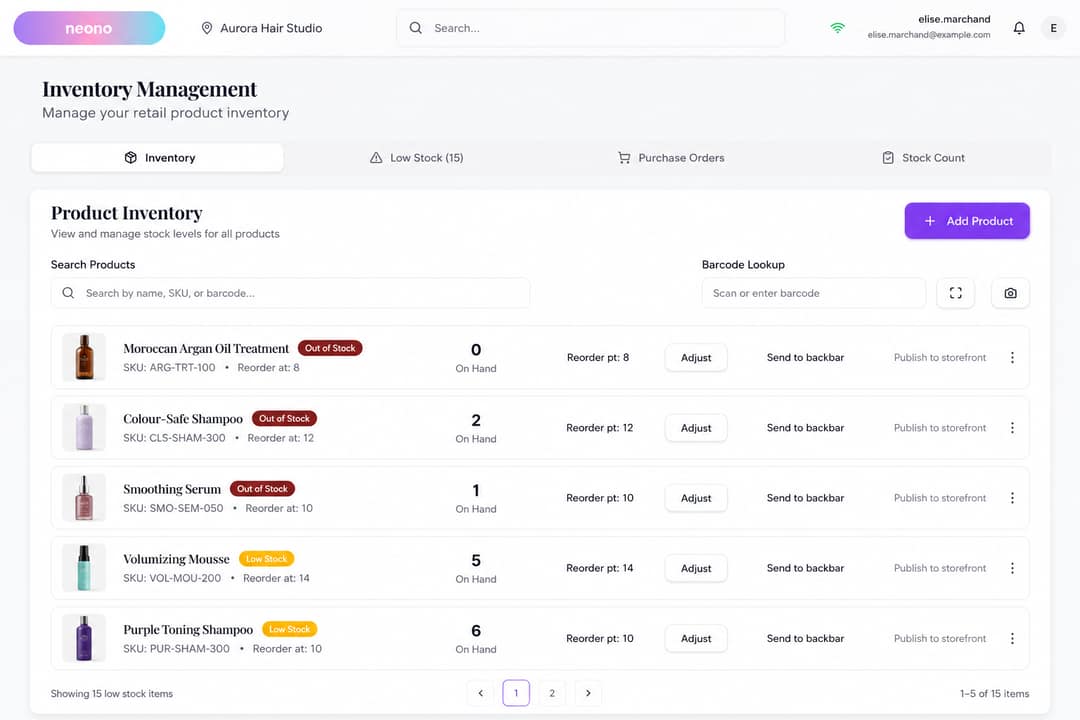
- 1Live on-hand counts
- 2Reorder alerts around the clock
What it does
Stock control built for a floor where the same bottle can be sold, opened for a service, or ordered in — without three separate spreadsheets keeping score.
Live on-hand counts
See on-hand and reserved quantities for every product and variant in one list, per location. No spreadsheet, no end-of-week reconciliation.
Search by name, SKU or barcode
Find any product in seconds — type a name, a SKU, or scan straight into the search field with any USB or Bluetooth scanner.
Variant-level tracking
Track each size, shade or option separately, with its own SKU, barcode and count — not one lumped total for the product.
Per-location stock
Each location keeps its own counts. Switch locations and the numbers follow.
Adjustments with a reason attached
Damaged, tester, miscount, gifted — correct a count on the spot and every adjustment is recorded with who, when and why.
Sales draw stock down automatically
A retail sale at the register, an appointment checkout and an online order all decrement the same count. Nothing double-counted, nothing missed.
In detail
Reordering
Stop finding out you're out when a client asks.
Set a reorder point once. NeonO re-checks every product against it automatically, around the clock, and tells you what to reorder and how much.
- Reorder point and reorder quantity per product, per location
- A Low Stock tab with the count on the tab, so you see the number before you click
- Each alert carries your reorder quantity, so the purchase order half-writes itself
- Just took a delivery? Force an immediate rescan instead of waiting
Purchase orders
From "we're low" to "it's on the shelf".
Raise a purchase order against a supplier, receive it when the box arrives — in full or in part — and stock updates itself.
- Line items, quantities and unit costs, with a PO number and expected delivery date
- Supplier records you reuse instead of retyping details every time
- Received units are added to stock automatically and the PO total updates
- Received 8 of 12? The PO goes partial, keeps the outstanding 4, and closes when the rest lands
- Draft, submitted, partial, received, cancelled — you always know what's still owed to you
Stock counts
Count the shelf without closing the shop.
Run a full count or a rolling cycle count. Scan as you go, see the variance before you commit, and apply the whole session in one action.
- Guided sessions pre-load every product for the location, so nothing is skipped
- Scan a barcode to increment the counted quantity, or type it in for anything that won't scan
- Counted-versus-expected for the whole session before anything changes
- Approve once and every corrected count is written as a recorded adjustment
- Role-controlled: only staff with the permission can run or apply a count

- Counted vs expected
- Scan or type
- Applied in one action
Retail vs backbar
The bottle you sell and the bottle you use aren't the same bottle.
Retail stock and backbar (professional) stock are tracked as two pools, and you move product between them deliberately.
- Professional product used on clients is tracked apart from shelf stock
- Opened a retail bottle for a service? Move it across in one dialog and both counts stay honest
- Send backbar stock to the retail shelf the same way when you want to sell it
- Backbar items carry their cost — which is what Colour Studio uses to cost a formula by the gram
- Backbar gets its own low-stock view, so you're told before a colour runs out mid-service
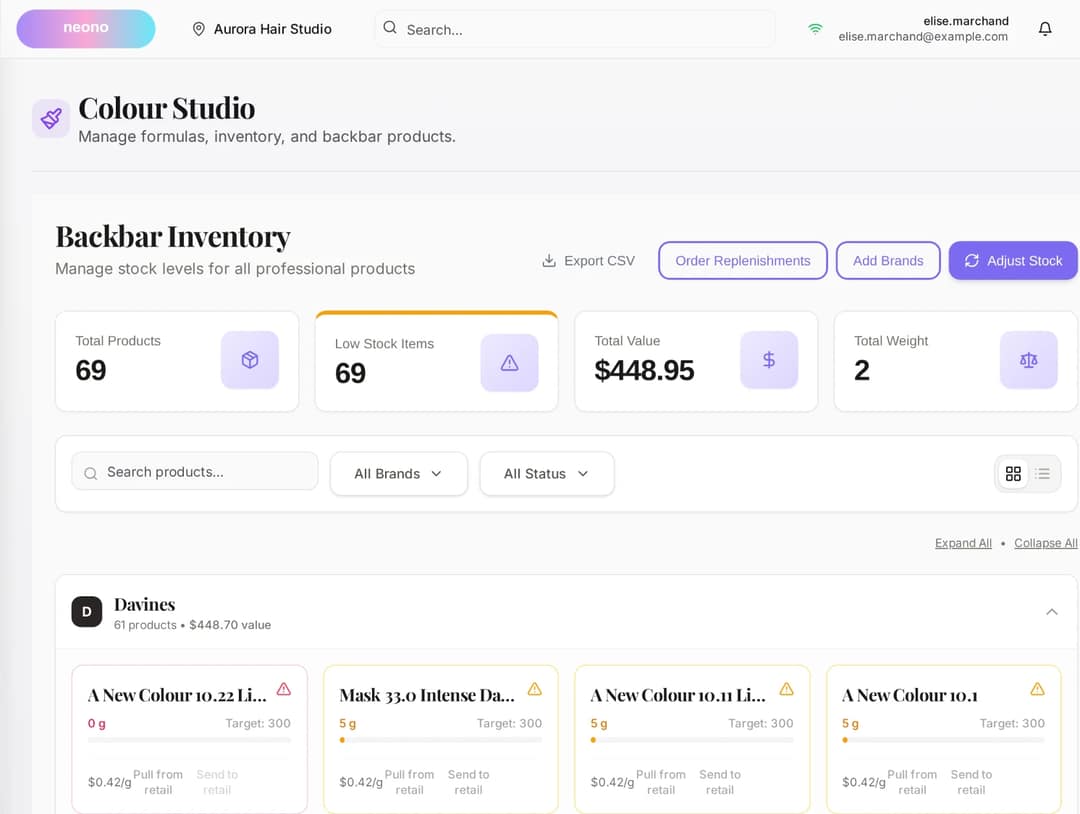
- 1Professional product used on clients is tracked apart from shelf stock
- 2Opened a retail bottle for a service? Move it across in one dialog and both counts stay honest
Adjustments
Every change to a count has a reason attached.
Damaged, tester, miscount, gifted — record it once and the number and the reason stay together.
- Enter a positive or negative correction on the spot, with an optional note
- Every adjustment is recorded with who, when and why
- A count that looks wrong next month has its answer sitting beside it
- Sales at the register, appointment checkouts and online orders all draw down the same count
Register and store
One catalogue behind the till and the storefront.
Push a retail product to your online store in one action instead of re-entering it as a separate listing, and let shoppers see honest availability.
- Publish a POS product to your store without duplicating the record
- A low-stock badge on the storefront — honest, and it converts
- Out-of-stock products collect an email for a back-in-stock waitlist instead of losing the sale
- Listings archive rather than vanish, and restore intact when you switch back
Restocking
Order professional stock straight from the platform.
Browse the Metro Beauty catalogue inside NeonO and order what you're low on — no separate wholesale portal, no minimum-order phone call.
- Browse and order professional product without leaving NeonO
- Orders are fulfilled and shipped direct to the salon
- Past orders sit with the rest of your inventory records, not in a supplier's inbox

Reorder point hit
Pomade · 3 left
Valuation
Inventory is money sitting on a shelf. See how much.
Alongside your stock counts, NeonO shows stock value at cost and what your retail sales actually earned — from real purchase costs and real sales.
- Total cost value of everything currently on hand at a location
- Retail sales margin over the last 30 days: revenue against cost of goods
- Unit cost and line totals captured on every PO, which is what feeds the valuation
Catalogue setup
Add a product once, and it's everywhere it needs to be.
Register, online store, stock list and reorder alerts all read the same product record.
- Name, price, cost, SKU, barcode and variants in one form
- Set the opening stock as you create the product, so it's countable from day one
- Products, services, memberships and gift cards live in the same catalogue
- Export the full catalogue as CSV any time, for your accountant or your own records
The math
What a missed reorder costs on one product.
One shampoo line, out of stock for a fortnight. Round numbers so you can substitute your own.
Retail lost while a product sits at zero
- Units of that product sold per week
- 6
- Retail price per unit
- $32
- Weeks out of stock before anyone notices
- 2
- Retail revenue not taken
- $384
Illustrative arithmetic with round inputs — not a NeonO benchmark and not a measured result.
Who it's for
A colour bar, a barber's shelf and a spa dispensary hold very different stock — the same counts and reorder points cover all three.
Included in your plan
Inventory and stock control is part of every NeonO plan — counts, reorder alerts, purchase orders, stock counts and backbar tracking, with no add-on module to buy.
NeonO
$24.99per billable seat, per month, CAD — only the first eight billable seats are charged
- Online booking, scheduling & reminders
- Point of sale, payments & tap to pay
- SMS & email marketing
- Free booking website & link-in-bio
- Multi-chair scheduling, commission & tips
- Analytics, reports & timesheet export
Processing is billed separately from your subscription. 2.39% + $0.30 per card-present transaction (CAD); 2.99% + $0.30 per online transaction (CAD). These are all-in rates — there is no separate application fee on top.
Questions about inventory
Do I need a barcode scanner?
No, but any USB or Bluetooth scanner works. Scanning pulls a product up on the inventory list, at the register, and during a stock count — otherwise you can search by name or SKU and type counts in.
How do low-stock alerts work?
You set a reorder point and a reorder quantity per product, per location. NeonO re-checks every product against its reorder point automatically around the clock, and lists what's below the line on a Low Stock tab. You can also force an immediate rescan after a delivery.
Can I set different reorder points for each location?
Yes. Reorder points and reorder quantities are stored per product, per location, so a fast-moving SKU downtown can alert earlier than the same SKU at a quieter location.
Can I count stock without closing?
Yes. Start a guided count session for a location and count as you go, scanning or typing quantities. You see counted-versus-expected for the whole session before anything changes, then apply it in one action.
What happens if my counted quantity doesn't match the system?
You see the variance for every line before committing. Once you approve the session, each difference is posted as an adjustment with the reason and timestamp attached.
How do purchase orders work?
Raise a PO against a supplier, add line items with quantities and unit costs, set an expected delivery date, then submit. When the shipment arrives, record what you received — stock updates automatically and the PO closes when fully received.
What happens when a partial delivery arrives?
Record what actually arrived. Those units are added to stock, the purchase order moves to partial with the outstanding quantity still on the books, and it closes itself when the remainder lands.
Can I reuse supplier details across POs?
Yes. Supplier records are saved once and reused, so you don't retype names, contacts or addresses every time you reorder.
Is backbar tracked separately from retail?
Yes. Professional stock and retail shelf stock are two separate pools, and you move product between them through a single dialog so both counts stay accurate.
Can I see what my stock is worth?
Yes. Alongside your stock counts you'll see the total cost value of everything on hand at a location, and your retail sales margin over the last 30 days — revenue against cost of goods.
Can I get my catalogue out of NeonO?
Yes. You can export the full catalogue as CSV any time, for your accountant, your insurer or your own records.
Can I restock professional product through NeonO?
Yes. Browse the Metro Beauty catalogue inside NeonO and order what you're low on. It ships direct to the salon, and past orders sit with the rest of your inventory records.
Related products
Put a real number on your shelf.
Start a free trial and see live counts, reorder alerts and backbar tracking working on your own products.